
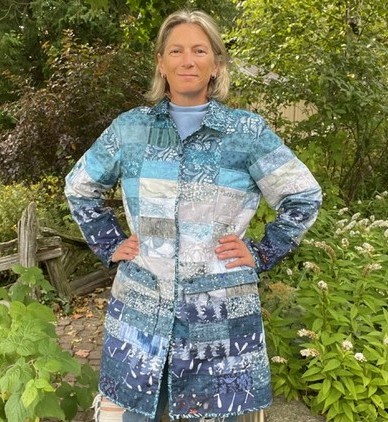
Until last summer, school principal Heather had focused on sewing garments and blogging for BERNINA International and Fabricville Canada. However, when classes ended, she decided to dive into how AI helps humans work smarter, not harder.
“There must be ways to create patterns without giving up my creativity,” she told herself.
So, she asked for help in designing a quilted coat. The bots found tutorials, mocked up samples and tested colour combinations for her.
“It spiraled from there,” said the resident of Sudbury, Ontario. “It found me Canadian fabric sources, sorted fabric by gradient and suggested fabric choices that aligned with my project.”
She had so much fun so she went to the next level. Her next project, an Eye Spy jacket, evolved into a series of built-in puzzles. She inserted near-field communication (NFC) tags that deliver scavenger hunt clues when scanned by a smartphone. For instance, she stitched in an L for loon. When activated, the NFC tag plays the sound of the bird’s cry.
She can also set latitude and longitude coordinates for sites to visit. Further, the reactive thread sewn into the garment turns pink when exposed to certain types of light.
“I wouldn’t have had a clue about all this until I used AI,” Heather said.
Another AI believer
Primarily an art quilter, retired Bay Street lawyer Margaret Grottenthaler began using AI to manipulate photos for portrait quilts.
“Before, I would draw images, trace elements for a pattern or turn still photos into graphics with other software,” she noted. Now, she starts with a photo or a drawing, then changes its style from a variety of options, such as pixelated or Van Gogh’s Starry Night.
In this case, she took a photo of Brookfield Place Galleria then removed all the people in the foreground. She applied a “painterly style” then asked Copilot for a design she could replicate in fabric.

For a jean jacket, Margaret used the iPhone editor to lift the image from her son’s selfie. Next, AI Photo Editor and AI Generator rendered it as a poster in the style of Roy Lichtenstein. She printed it onto fabric and generated more ideas for the fabric collage background.
“Of course, I could ask it again and it will do a crappy job,” she added. “As I keep asking it to create designs, and tell it what I like and don’t like, it learns to do better. Admittedly, it often produces something hideous.”

The good, the bad and the ugly
Earlier this year, Margaret asked Copilot to produce a patchwork quilt with five trees and a pond with reeds. After several tries, it produced designs with three, six, ten and eleven trees.
“It’s kind of bad at math and geometry,” she said with a laugh. However, she liked the background on one draft and incorporated that into her design.
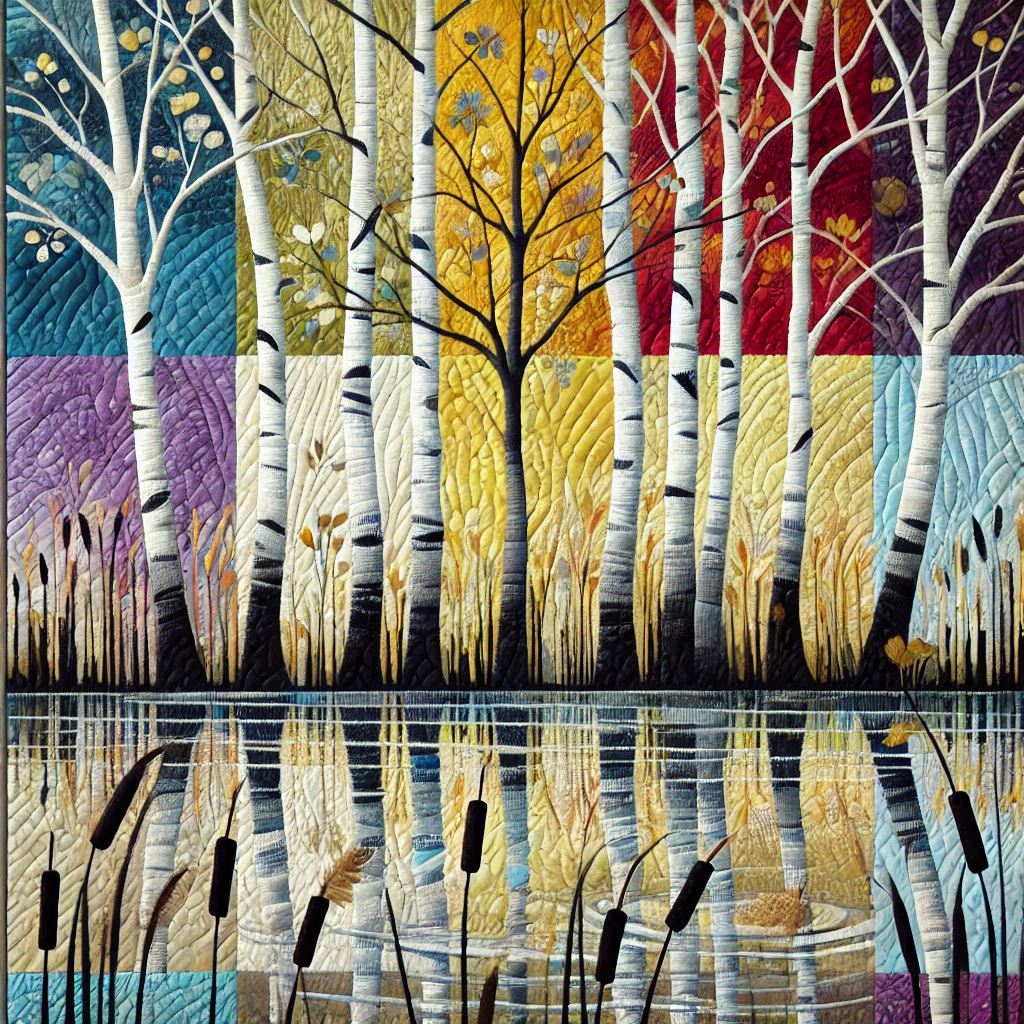
At times, she finds it easier to start over with a better description if an image comes out too simple or with a limited colour range.
When it messed up a Tumbling Blocks pattern, she told the program its mistake. Subsequently, it replied, “ You’re right. Let me try again.” It took another six or seven tries to get the right instructions. “Unless you direct it, it’s not going to learn,” Margaret said.
Heather agreed the bots often err on measurements, especially when generating images of hands. As such, quilters still need to use their critical thinking and literacy skills, she said.
On the upside, Heather finds AI curates her searches better than a simple Google search. When she wanted to make 3D pinwheel blocks, Copilot sought out tutorials to make them faster.
“It gets to know what fabrics you like to use,” Heather added. “Stick with it and it gets smarter based on what you tell it.”
For her jacket, she uploaded a photo to test her choice of a high-contrast binding. It looked terrible so she substituted a low-contrast batik and loved the results. The bots can also change the length of a jacket or adapt a collar.
Questions and concerns
Ever the educator, Heather began sharing her AI insights via the Quilting and Sewing Canada Facebook group. Not surprisingly, she found resistance from those who worry about the loss of creativity and the environmental impact of the energy required to power these functions.
“These are all valid concerns. It started a conversation…What people don’t understand, they fear. I use it in a way that benefits me and my learning.”
Similarly, Margaret faced questions when presenting to the Toronto Modern Quilters’ Guild. One woman asked, “Where the line between your creativity and the computer’s?”
“It’s about transparency,” Margaret reflected afterward. I don’t say, ‘I used my sewing machine to make this quilt.’ It’s still my design, my photos, my choices and my methods. It’s not a quilter.”
“You don’t have to involve your creative mind in every phase of the quilt,” she said. “You can start with your own idea then generate more…Artists have always used technology to help them along.”
Tips and tricks
Margaret favours AI Generator, an Adobe product bought via the App Store, powered by Nano Banana. “It understands photos where Copilot is guessing part of the time,” Margaret said.
For an artist’s statement, Copilot is good at describing techniques, but sometimes, it gets “too flowery or braggy.” For dyeing, Margaret uploads a colour for Copilot to create a formula.
Heather created a guide for sewers with cursory introduction to some free applications. Her initial list covered Chat GPT, Edge’s Copilot, Google’s Gemini and Bing’s Image Creator.
Her best practices:
- Speak to it like a teenager or a toddler, clearly and succinctly.
- If you don’t get what you want, go back and rephrase.
- Double-check information.
- Use it in the morning before workplace users log in and bog it down.
- Tap into free versions if you’re not in a rush since it limits the number of renders per day.
Editor’s note: While CQA/ACC does not have explicit rules about using AI in its National Juried Show, judges expect entrants to acknowledge it in the credits.